#mobile

#application

#figma
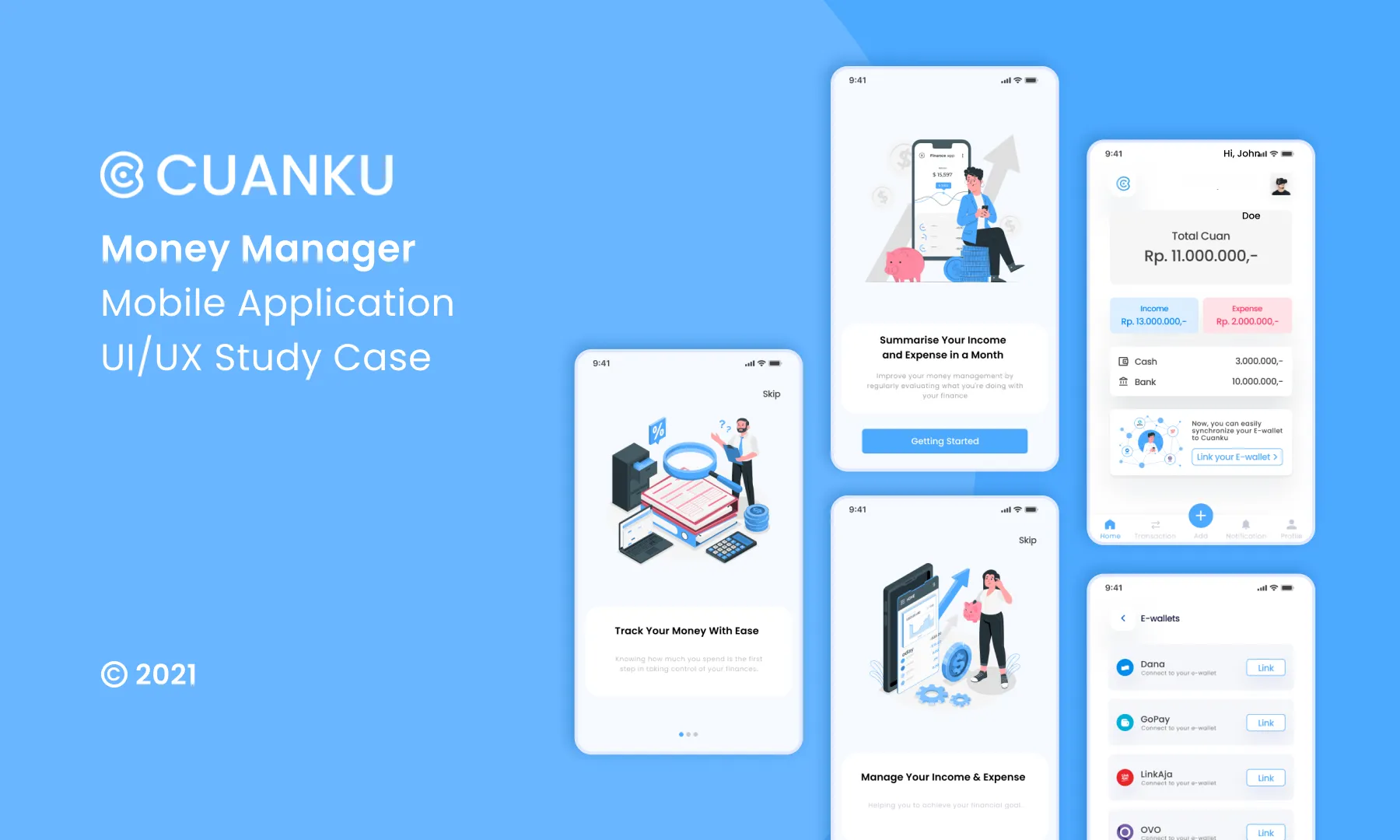
Cuanku Money Manager Mobile Application

Cuanku Money Manager Mobile Application

Cuanku Money Manager Mobile Application

Cuanku Money Manager Mobile Application

Cuanku Money Manager Mobile Application

Cuanku Money Manager Mobile Application

A project related to financial management and the development of a mobile application called Cuanku. The project involved conducting research, creating user personas, ideation, prototyping, and usability testing to improve the user experience of the application. The team collaborated with project managers and made recommendations based on findings to enhance the app's features and usability. The project aimed to address the challenges faced by urban Millennials and Generation Z in managing their finances effectively.

A project related to financial management and the development of a mobile application called Cuanku. The project involved conducting research, creating user personas, ideation, prototyping, and usability testing to improve the user experience of the application. The team collaborated with project managers and made recommendations based on findings to enhance the app's features and usability. The project aimed to address the challenges faced by urban Millennials and Generation Z in managing their finances effectively.

A project related to financial management and the development of a mobile application called Cuanku. The project involved conducting research, creating user personas, ideation, prototyping, and usability testing to improve the user experience of the application. The team collaborated with project managers and made recommendations based on findings to enhance the app's features and usability. The project aimed to address the challenges faced by urban Millennials and Generation Z in managing their finances effectively.

A project related to financial management and the development of a mobile application called Cuanku. The project involved conducting research, creating user personas, ideation, prototyping, and usability testing to improve the user experience of the application. The team collaborated with project managers and made recommendations based on findings to enhance the app's features and usability. The project aimed to address the challenges faced by urban Millennials and Generation Z in managing their finances effectively.

A project related to financial management and the development of a mobile application called Cuanku. The project involved conducting research, creating user personas, ideation, prototyping, and usability testing to improve the user experience of the application. The team collaborated with project managers and made recommendations based on findings to enhance the app's features and usability. The project aimed to address the challenges faced by urban Millennials and Generation Z in managing their finances effectively.

A project related to financial management and the development of a mobile application called Cuanku. The project involved conducting research, creating user personas, ideation, prototyping, and usability testing to improve the user experience of the application. The team collaborated with project managers and made recommendations based on findings to enhance the app's features and usability. The project aimed to address the challenges faced by urban Millennials and Generation Z in managing their finances effectively.

Nov - Dec 2021

Timeline

UI/UX Designer

Role

Nov - Dec 2021

Timeline

UI/UX Designer

Role

Introduction

Introduction

During the last two chapters of Binar Academy’s UI/UX Research and Design Bootcamp. We’ve been divided into a group and teamed up with Project Managers to create a final project. This team consists of supportive members i.e. Mirza, Damar, Bethari, Efando as UX Researchers, UX Designers, and UI Designers, as well as Bunga & Willy as Project Managers. Long story short, after several discussions of topics, finally we selected the most relevant topic in our daily necessities.

During the last two chapters of Binar Academy’s UI/UX Research and Design Bootcamp. We’ve been divided into a group and teamed up with Project Managers to create a final project. This team consists of supportive members i.e. Mirza, Damar, Bethari, Efando as UX Researchers, UX Designers, and UI Designers, as well as Bunga & Willy as Project Managers. Long story short, after several discussions of topics, finally we selected the most relevant topic in our daily necessities.

Background

Background

In this digital era, everything is easy and very accommodating. However, it also tends to make us spend money or make transactions that we don’t want. It caused the income to just disappear easily without having any savings.

Considering those challenges above, in addition to existing software such as Microsoft Excel, we require proper integrated financial management which can manage and record income, expenses, and financial planning in cash and bank accounts form effectively.

In this digital era, everything is easy and very accommodating. However, it also tends to make us spend money or make transactions that we don’t want. It caused the income to just disappear easily without having any savings.

Considering those challenges above, in addition to existing software such as Microsoft Excel, we require proper integrated financial management which can manage and record income, expenses, and financial planning in cash and bank accounts form effectively.

Understanding The Challenge

Understanding The Challenge

Before we did some research on our expected target users, together with the Project Managers, we tried to find out simple problems regarding financial management with our members. Such as:

“I don’t know why my money’s gone so fast. Sometimes I like to pay for others but it wasn’t recorded.” — Member A

“Sometimes I use a debit card to buy things, but I forget to record my expenses. At the end of the month, where’s all my savings gone?” — Member B

“I’ve already set up a budget for monthly needs, but why do I uncontrollably spend money from my savings account?” — Member C

On the other hand, these are the common problems for urban Millennials and Generation Z in Indonesia. We considered that our expected target users’ demographic and behaviors are more or less similar to us. So, we would like to explore and find out more about the pattern through research. To support the consideration, these are the objectives:

  • To find out users’ needs & find out information about financial records.

  • To find out the types of users’ worries in managing finances for one month.

  • To find out what users need or expect in helping financial records.

Before we did some research on our expected target users, together with the Project Managers, we tried to find out simple problems regarding financial management with our members. Such as:

“I don’t know why my money’s gone so fast. Sometimes I like to pay for others but it wasn’t recorded.” — Member A

“Sometimes I use a debit card to buy things, but I forget to record my expenses. At the end of the month, where’s all my savings gone?” — Member B

“I’ve already set up a budget for monthly needs, but why do I uncontrollably spend money from my savings account?” — Member C

On the other hand, these are the common problems for urban Millennials and Generation Z in Indonesia. We considered that our expected target users’ demographic and behaviors are more or less similar to us. So, we would like to explore and find out more about the pattern through research. To support the consideration, these are the objectives:

  • To find out users’ needs & find out information about financial records.

  • To find out the types of users’ worries in managing finances for one month.

  • To find out what users need or expect in helping financial records.

Research

Research

As we discussed earlier, we decided to conduct a research with a qualitative method through user interviews by looking for 5 expected target users. Why did we choose this method? We thought this would be a good option to empathize with our expected target users, so that we can explore their points of view, activities, experiences, pain points, and needs.

Bellow are the following requirements:

  • Age: 18–35 years old.

  • Gender: Male & Female

  • Employees and/ students who live alone and/ fresh graduates and/ have income.

  • Smartphone users.

  • Need a system to manage financial incomes & expenses.

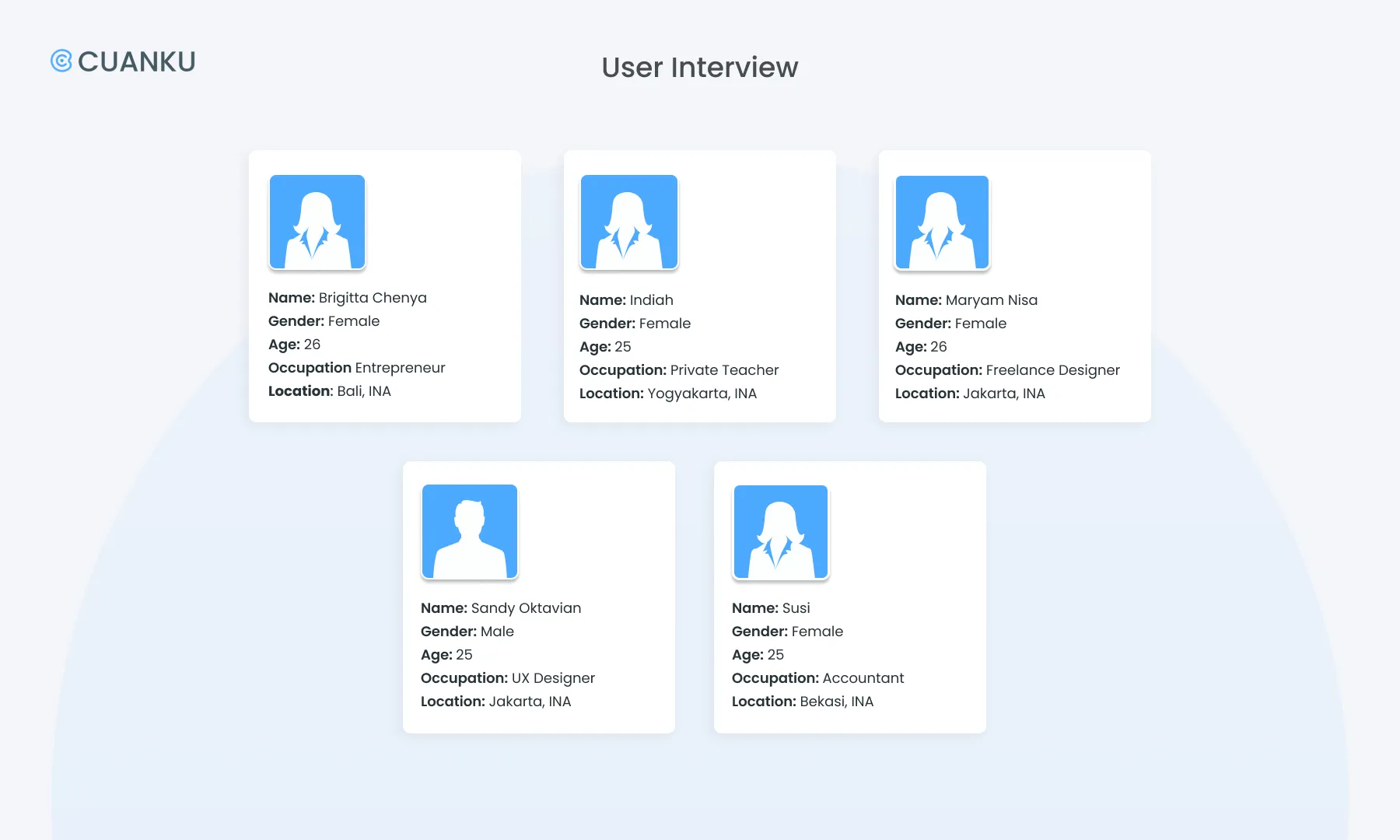
We chose 5 participants that more or less suitable to the requirements:

As we discussed earlier, we decided to conduct a research with a qualitative method through user interviews by looking for 5 expected target users. Why did we choose this method? We thought this would be a good option to empathize with our expected target users, so that we can explore their points of view, activities, experiences, pain points, and needs.

Bellow are the following requirements:

  • Age: 18–35 years old.

  • Gender: Male & Female

  • Employees and/ students who live alone and/ fresh graduates and/ have income.

  • Smartphone users.

  • Need a system to manage financial incomes & expenses.

We chose 5 participants that more or less suitable to the requirements:

-

-

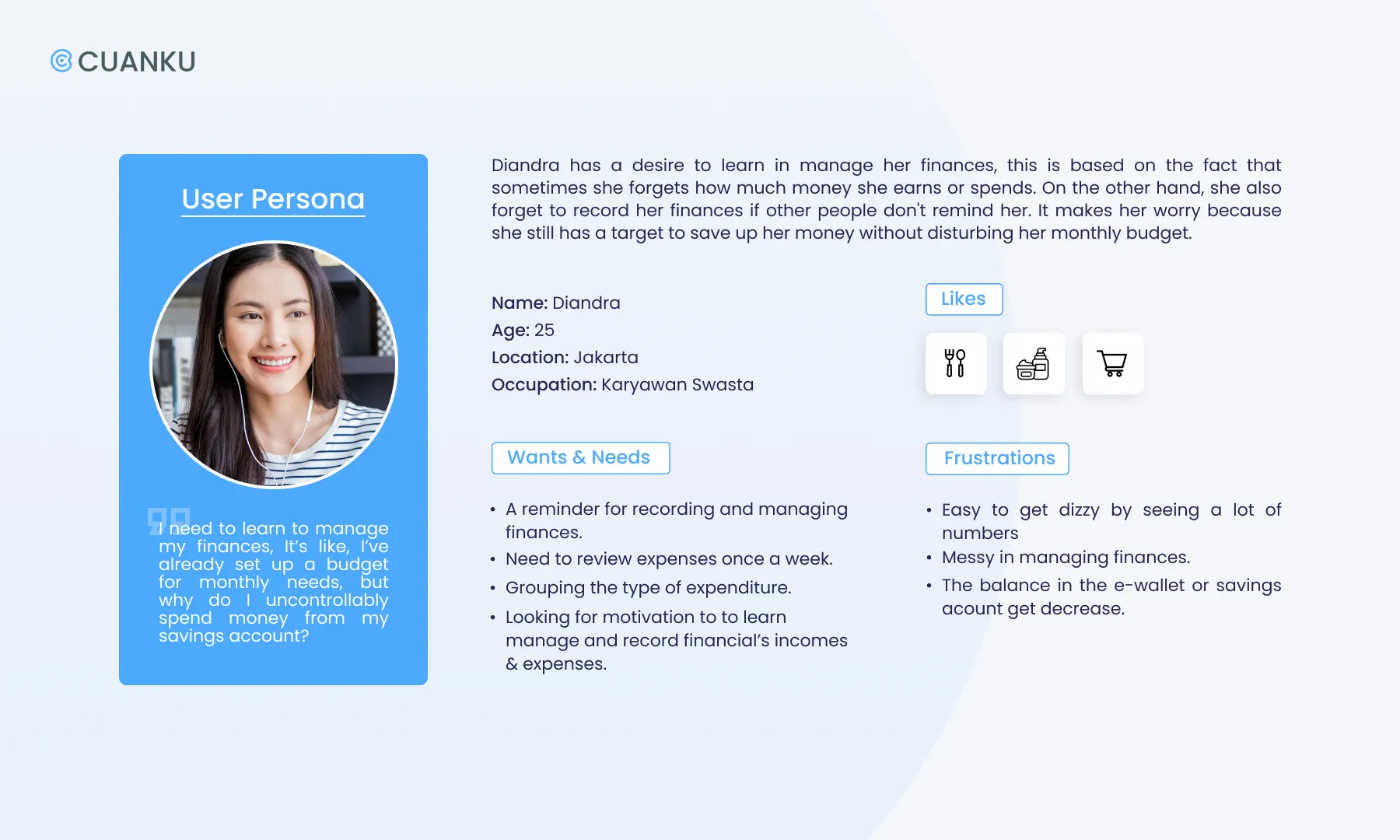
After doing research from 5 participants, we got clearer demographic and behavior patterns then created a user persona that more or less represents our research’s result.

After doing research from 5 participants, we got clearer demographic and behavior patterns then created a user persona that more or less represents our research’s result.

-

-

Based on the user persona that has been created, here’s the point of view:

User:

People with an age range of 18–35 years old who actively use smartphones and already have incomes.

Needs:

Manage their finances independently and the need to record income and expenses.

Insights:

Users need to manage their finances independently to know the expenses they have made and to control their incomes & expenses.

Based on the user persona that has been created, here’s the point of view:

User:

People with an age range of 18–35 years old who actively use smartphones and already have incomes.

Needs:

Manage their finances independently and the need to record income and expenses.

Insights:

Users need to manage their finances independently to know the expenses they have made and to control their incomes & expenses.

-

-

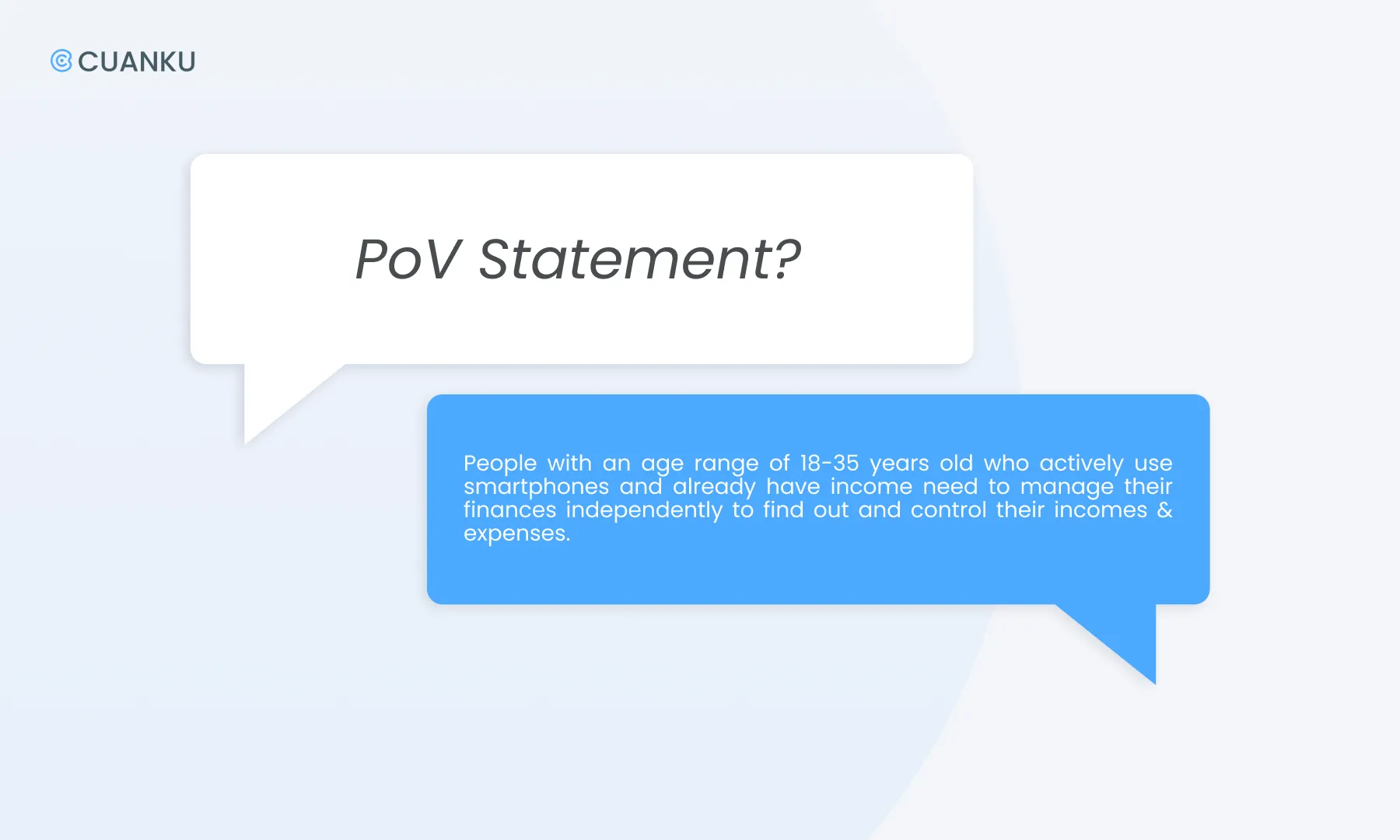
So, we came out with the Point of View Statement and How Might We.

So, we came out with the Point of View Statement and How Might We.

-

-

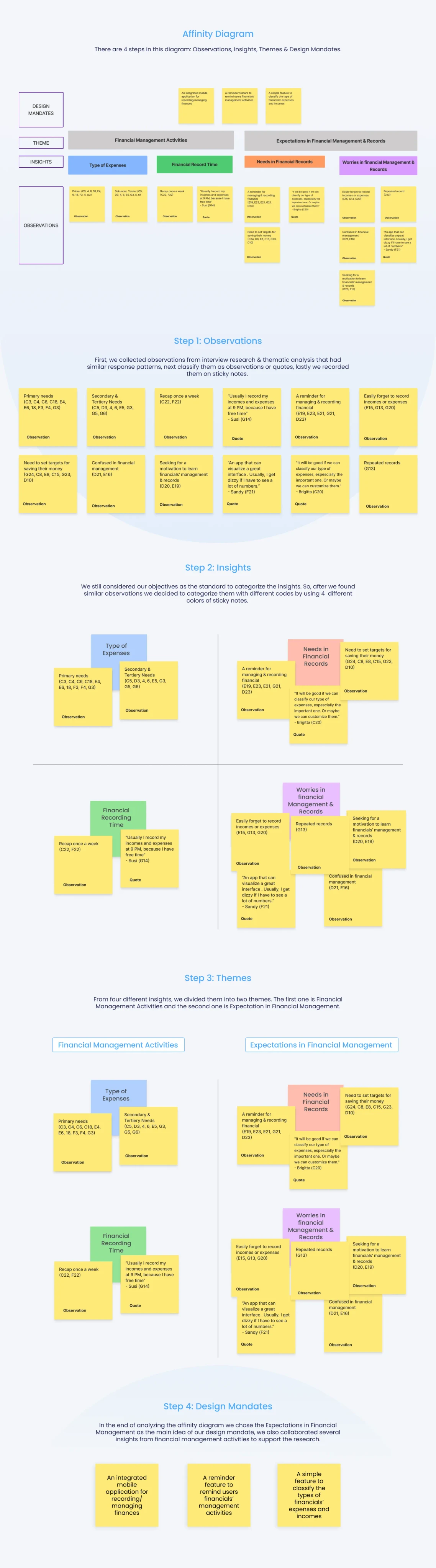
From the PoV Statement and HMW, we tried to continue our research by analyzing our participant’s answers in thematic analysis, then we found out the patterns and continued to discuss them in the affinity diagram.

From the PoV Statement and HMW, we tried to continue our research by analyzing our participant’s answers in thematic analysis, then we found out the patterns and continued to discuss them in the affinity diagram.

-

-

In the affinity diagram, we went to in-depth exploration, and breakdown the research from our observations until design mandates. So, now basically we’re going to describe them step by step.

In the affinity diagram, we went to in-depth exploration, and breakdown the research from our observations until design mandates. So, now basically we’re going to describe them step by step.

Insights & Recommendation

Insights & Recommendation

After deciding to select two insights and collaborating them into a big idea of design mandate, then we expanded them into 3 recommendations of design. There are:

After deciding to select two insights and collaborating them into a big idea of design mandate, then we expanded them into 3 recommendations of design. There are:

1

— An integrated mobile application for recording/managing finances.

Creating a mobile app that can help users to record expenses/incomes/every transaction that the user makes.

1

— An integrated mobile application for recording/managing finances.

Creating a mobile app that can help users to record expenses/incomes/every transaction that the user makes.

1

— An integrated mobile application for recording/managing finances.

Creating a mobile app that can help users to record expenses/incomes/every transaction that the user makes.

2

— A simple feature to classify the types of expenses and incomes.

Provide the types of expenses that users can choose according to the transactions they do.

2

— A simple feature to classify the types of expenses and incomes.

Provide the types of expenses that users can choose according to the transactions they do.

2

— A simple feature to classify the types of expenses and incomes.

Provide the types of expenses that users can choose according to the transactions they do.

3

— A reminder feature to notify users of their financials’ management activities.

The notifications will help users to: - Record their incomes and expenses everyday. - Recap their financials’ incomes & expenses this week. - Their expenses have almost exceeded their income.

3

— A reminder feature to notify users of their financials’ management activities.

The notifications will help users to: - Record their incomes and expenses everyday. - Recap their financials’ incomes & expenses this week. - Their expenses have almost exceeded their income.

3

— A reminder feature to notify users of their financials’ management activities.

The notifications will help users to: - Record their incomes and expenses everyday. - Recap their financials’ incomes & expenses this week. - Their expenses have almost exceeded their income.

Decision

We discussed with the project managers, then they provided comments & suggestions such as the prototype would be integrated to other existing financial apps, including e-wallet (in this case we chose the big four; Dana, Gopay, LinkAja & Ovo) so it could be our expected Unique Selling Point. We considered and agreed that was the most suitable recommendation due to our timeline and MVP e.a: a mobile app that can manage & conduct financial records and integrate to other existing financial apps.

Next, on the other meeting discussion. We discussed the name for this project and went through a voting session, Cuanku was chosen over five other name options eventually. Then, we started to create a simple branding & logo.

Ideation

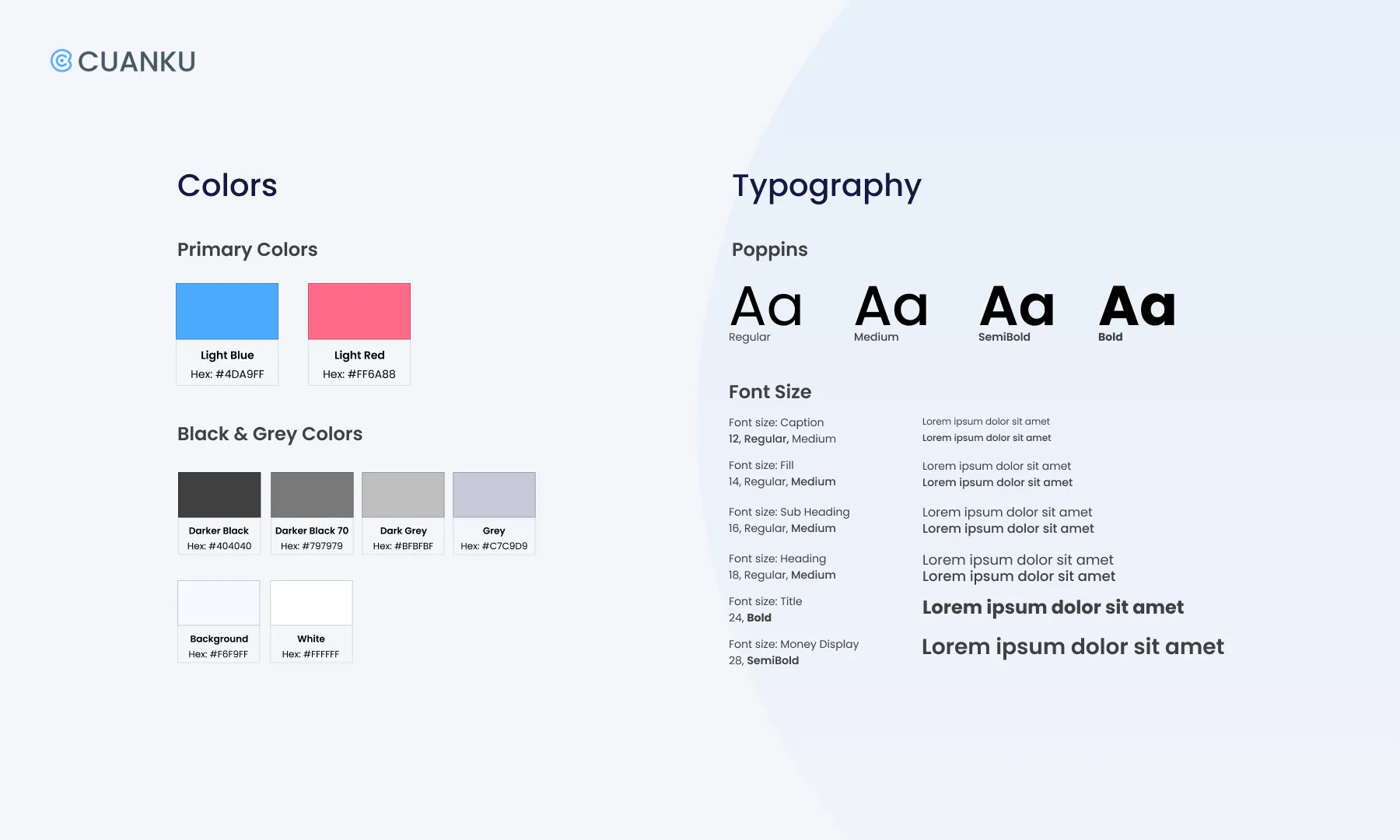
Before we continued to start working on the prototype, we set up the style guide for a simple logo, guideline and interface design. We use Blue as the dominant color which represents the financial application itself; trust, security & responsibility. Then we picked a lighter shade which gave us the persona of our participants due to the research.

-

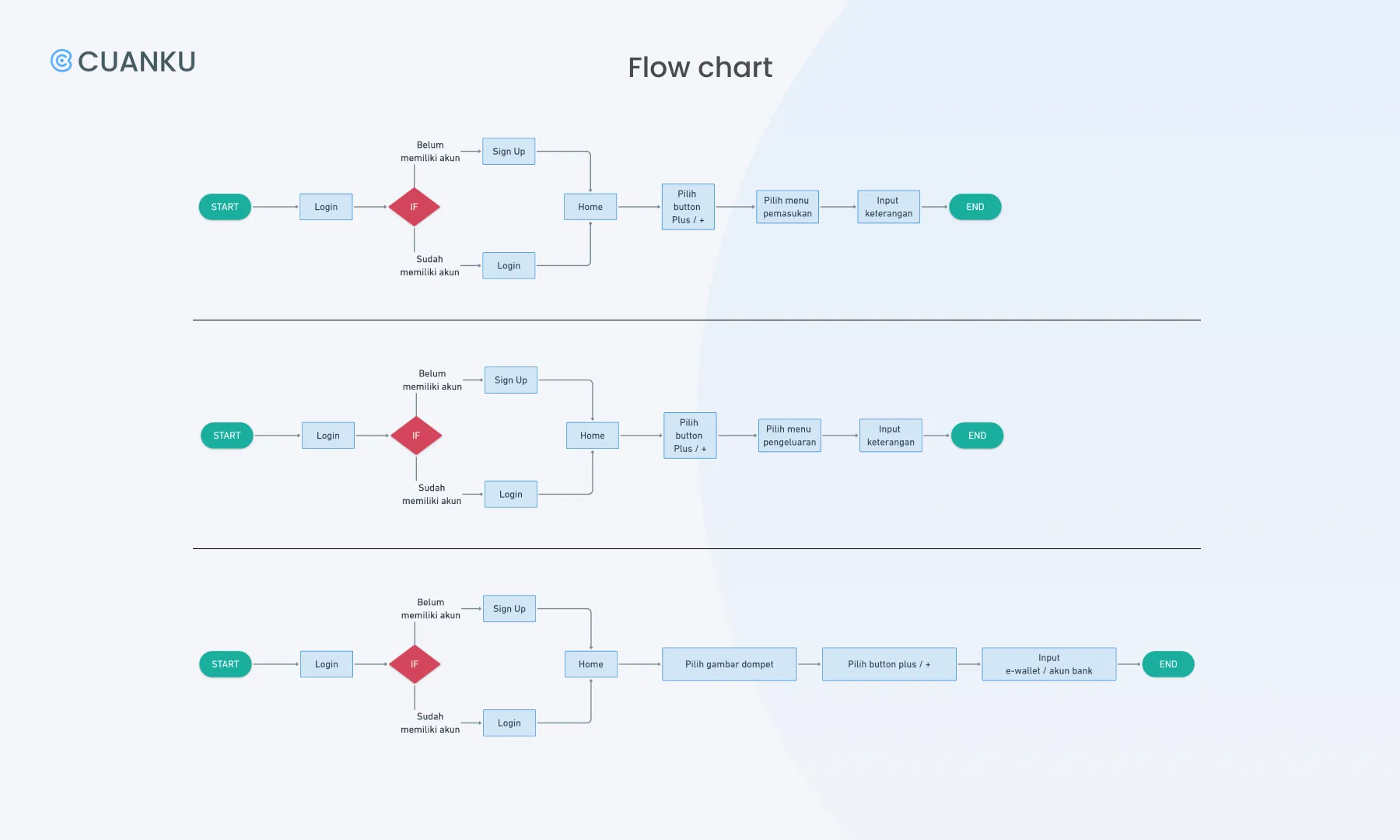
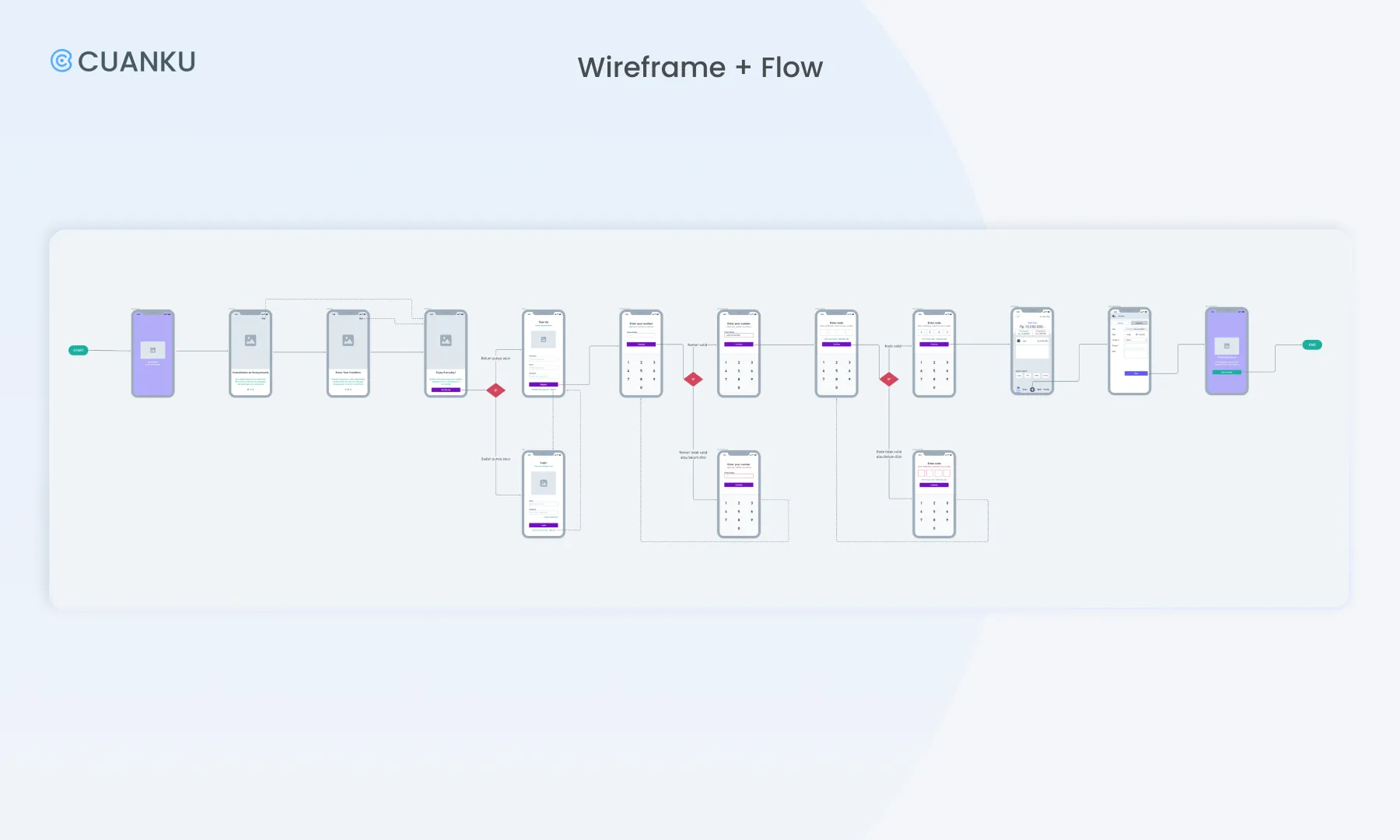
Once we selected the most suitable recommendation due to our MVP, we began to make a user flow chart in whimsical. By doing this, we were able to go through a lot of design ideas and quickly find the right ones. In this step, we just focus on the main feature flow of Cuanku which is adding the transaction so Cuanku can track users’ incomes or expenses.
Low-Fi Prototype

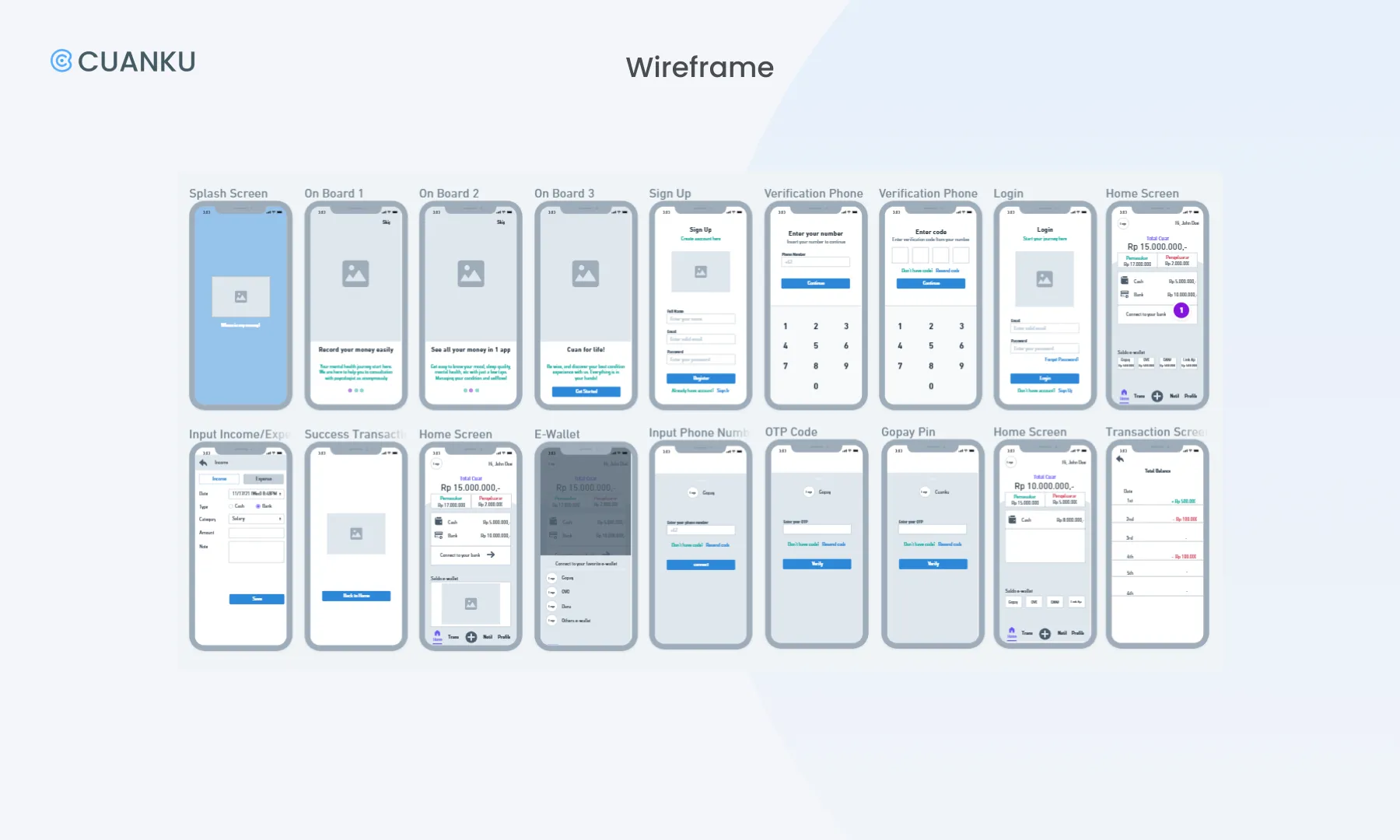
The prototyping process starts with a wireframe, we were using whimsical to design the digital prototype. Followed by giving flow to the wireframe according to the development of the previous flow chart. We decided to use Google Pixel 2 screen size (411x731 px) because most smartphone users in Indonesia use android. This visual guides us to figure out about the interface, but we focused on the functionality rather than the looks.
Hi-Fi Prototype

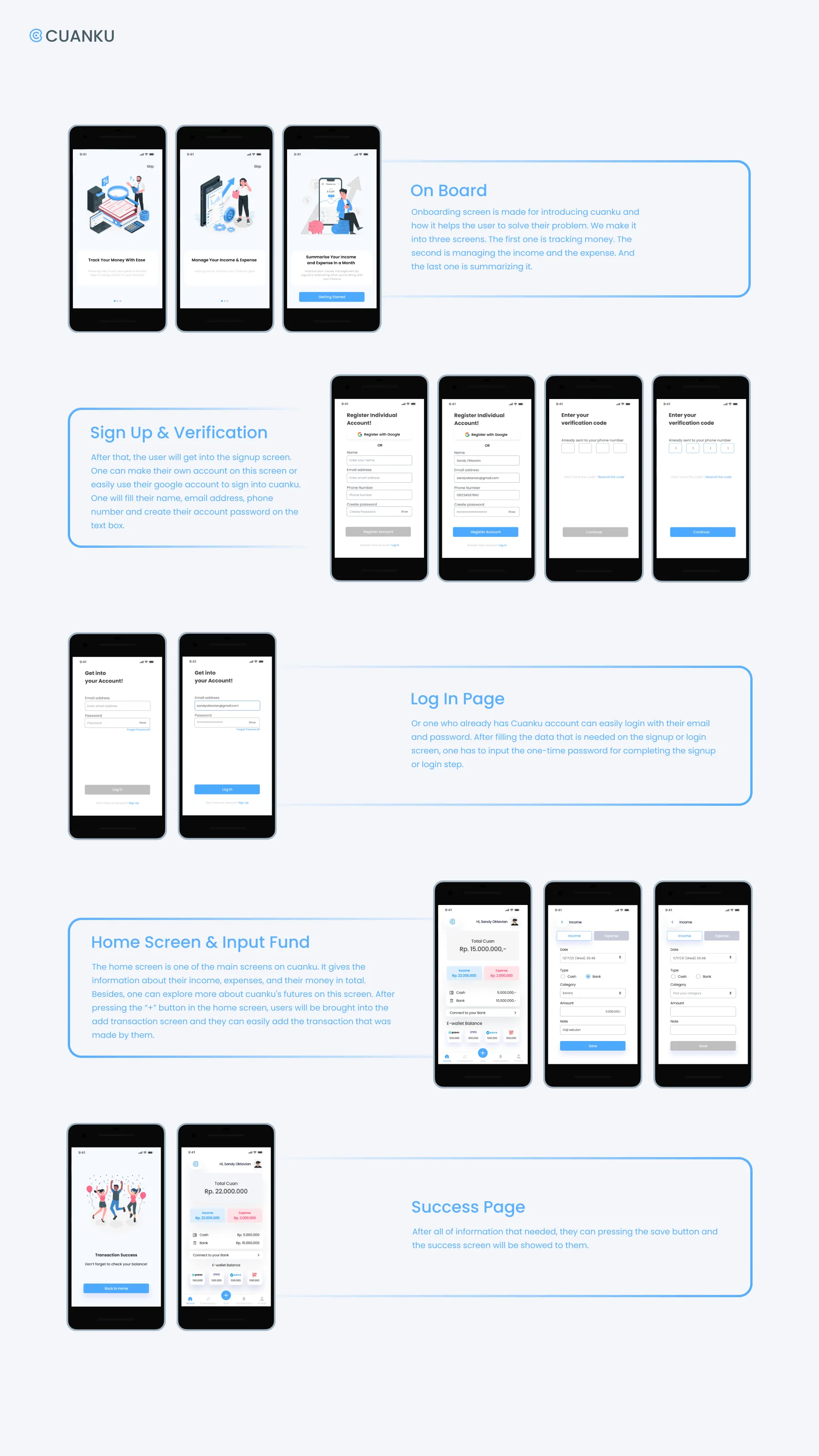
After creating the wireframe and flow we continued our step to a high fidelity prototype by using Figma Design. In our study case, we went through 2 sprints and iterations before finding the final design. So, it will be explained in this section.

User Interface

According to the style guide and user persona, we created the user interface design. We chose to make it simple as it can be and hopefully can solve the problem of our research participants.

Sprint 1 — Usability Testing, Findings & Iteration

Once we finished the prototype, we continued to conduct usability testing interviews with 5 participants to get feedbacks and research results. From 5, we found 3 findings that have the same pattern.

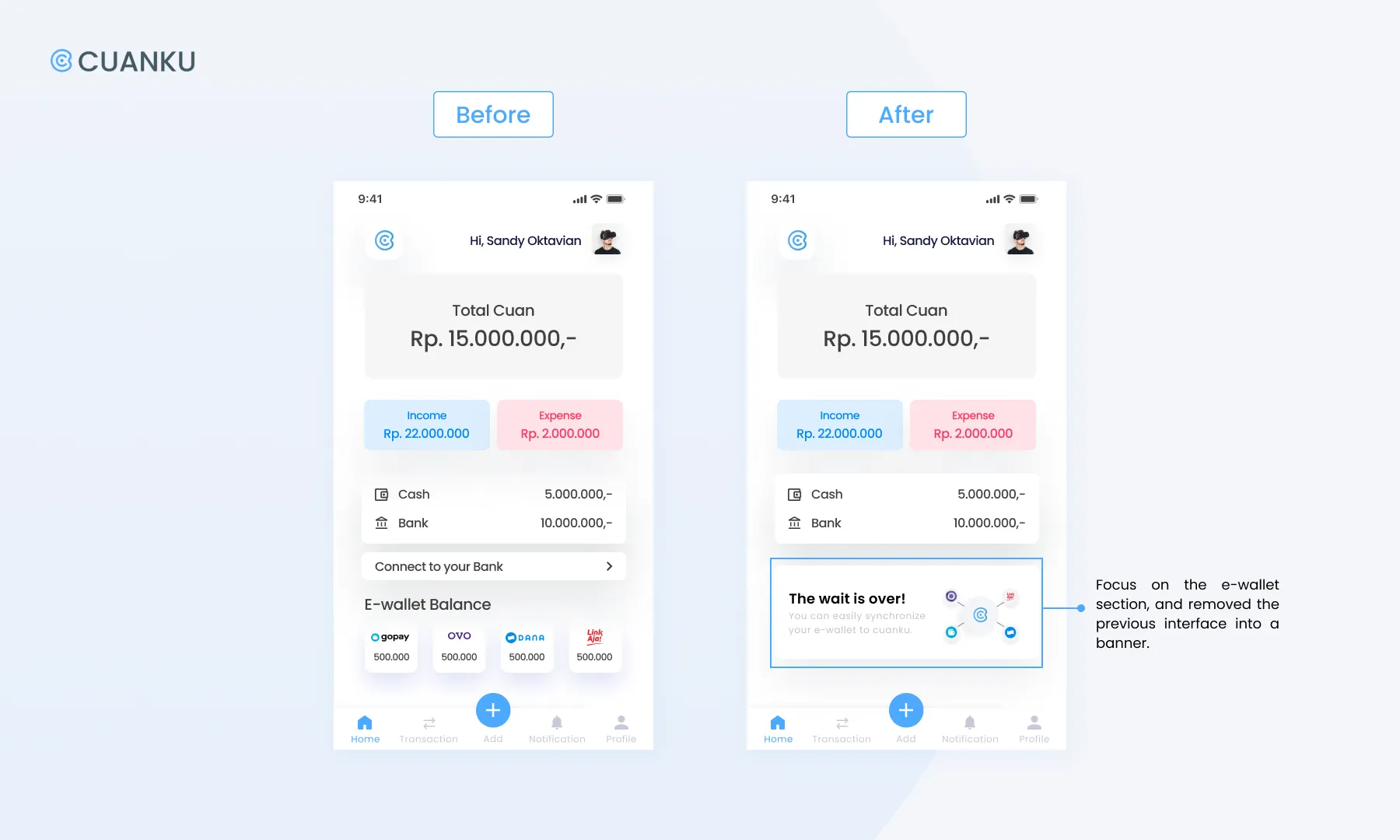
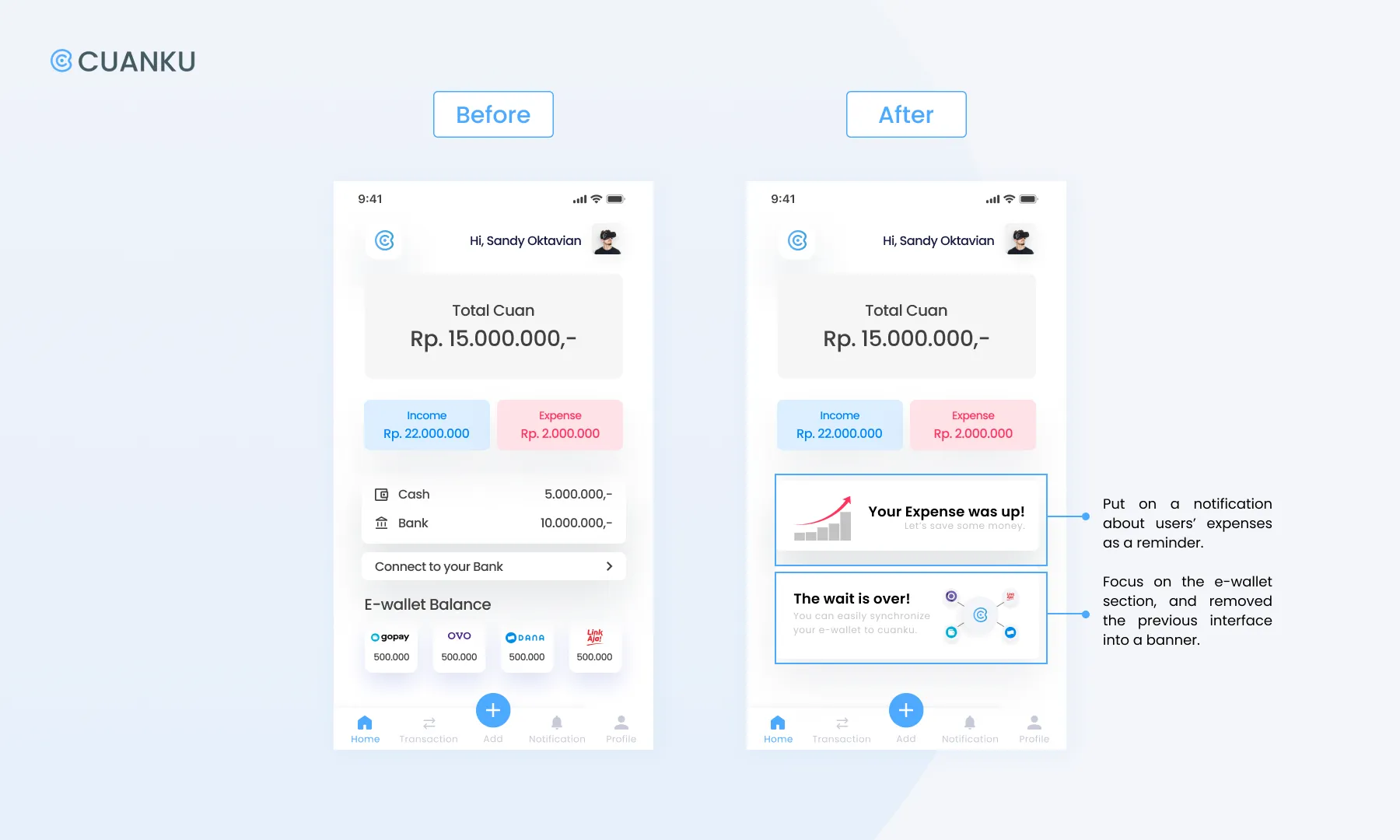
Finding #1: Most of the participants were confused by the appearance of the e-wallet logos on the home screen. The unique thing was that they thought they could do e-wallet transactions in Cuanku prototype.

Recommendation: We focus on the e-wallet section, and remove the previous into a banner.
-

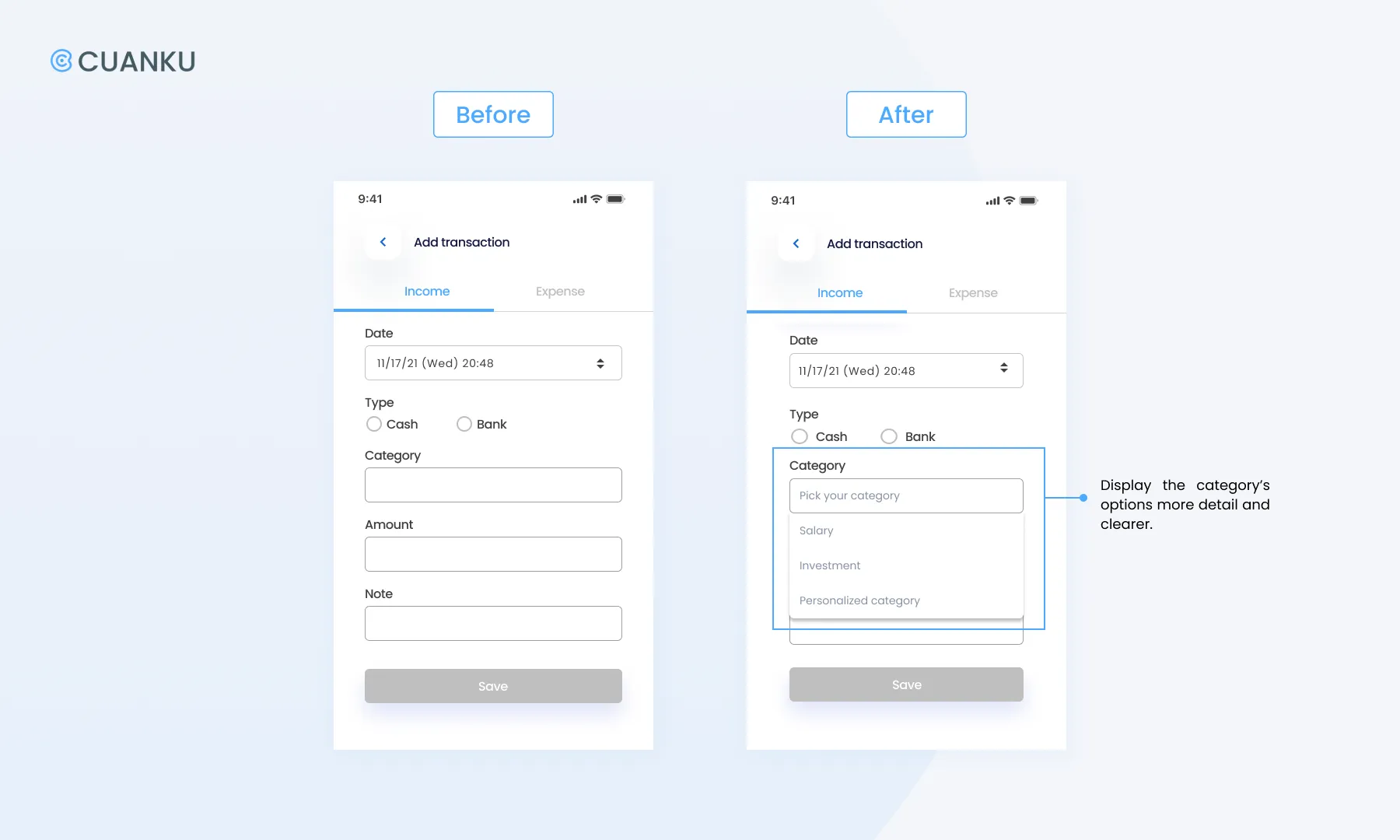
Finding #2: Some participants felt they needed more time to explore the “input fund page” to process or might create their own categories of income or expenses.

Recommendation: Provide dropdown menus for categories where users can fill in the name of the category they want, later they can classify it according to their own preferences.
-

Finding #3: There were participants who feel that they need to be given a daily reminder/a reminder because they are almost/already over budget.

Recommendation: Provide notifications that can help users to remind them about their expenses.
Iteration-Decision

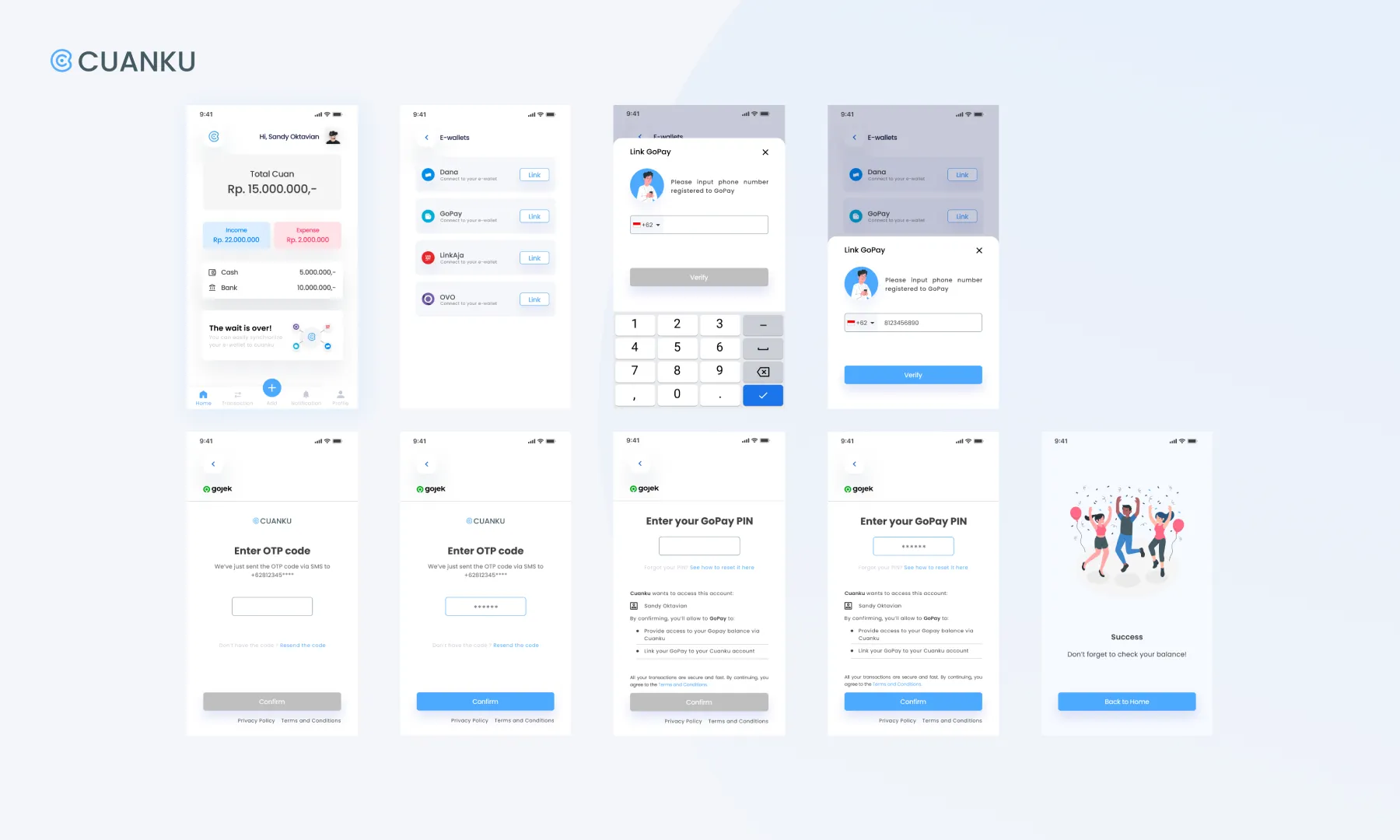
After several discussions with our facilitators due to our MVP and schedule, we decided to develop the recommendation from finding 1 by focusing on recording money with e-wallets and connecting them with Cuanku so we could achieve the MVP (and USP). So, we added these two iterations:

— Synchronizing Screen

For more advanced features we decided to offer the synchronizing option. So, User can easily synchronize their favorite e-wallet to Cuanku. So they can track their e-wallet transaction in Cuanku.

-

— E-wallet Balance Screen

After synchronizing the e-wallet, users can check their historical e-wallet transactions in Cuanku.

Sprint 2 — Usability Testing, Finding & Iteration

In approximately 2 weeks we conducted the second sprint to revise the selected recommendations from the first sprint’s usability testing. Once again, we conducted another usability testing interview with 5 participants to get new research results and found a finding who had the same pattern.

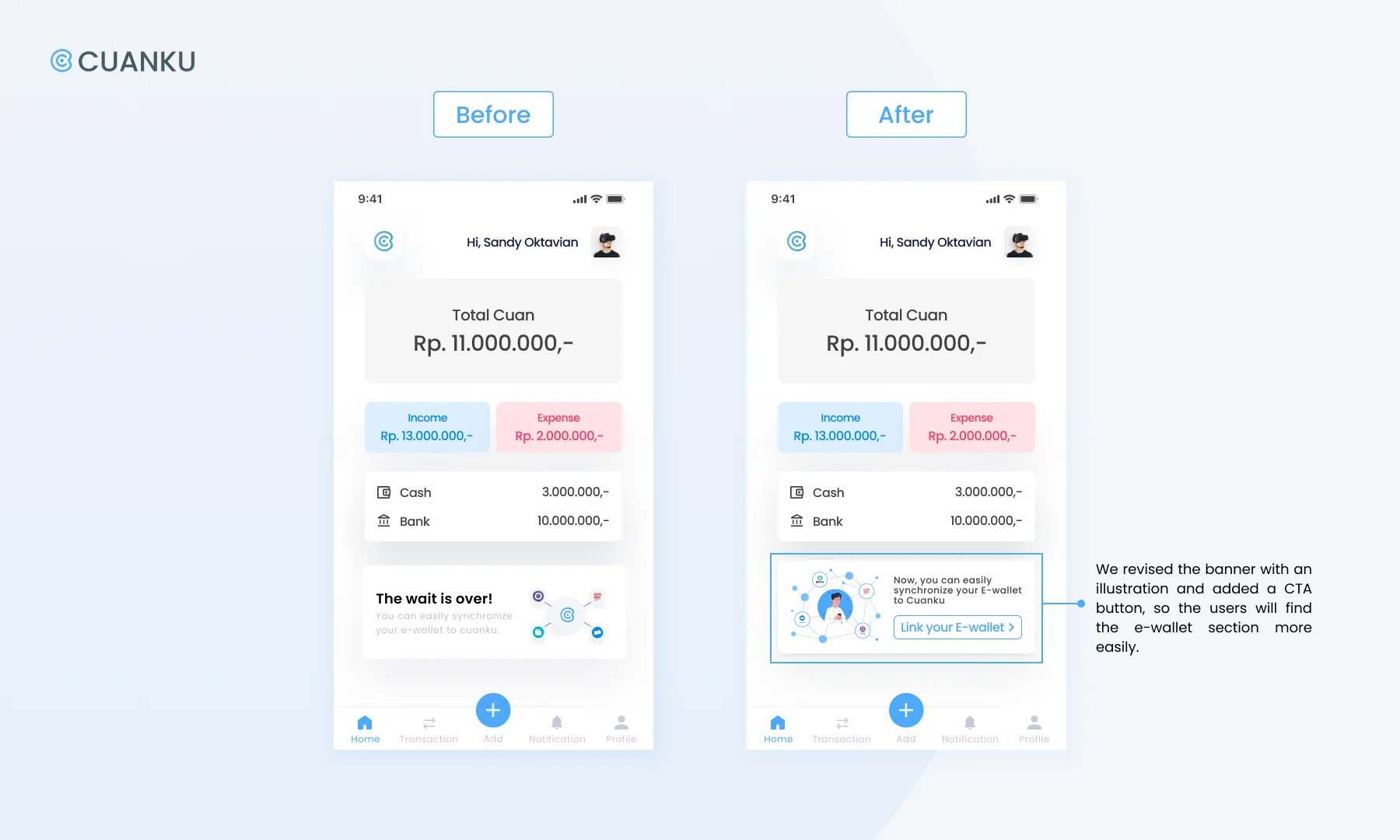
Finding: Most of the participants found it difficult to find a CTA to link the e-wallet with Cuanku (according to the scenario: Gopay). The participants took more seconds to process and find out about the e-wallet on the Home Screen.

Recommendation: Revise the banner which contains information to help the user connect Cuanku’s prototype with the e-wallet they use by adding a more user-friendly/understandable CTA button.

Latest Iteration:

You can visit and try our latest prototype by clicking this maze.
Conclusion

Working on Cuanku was so challenging yet interesting for us since we had to be creative and critical at the same time. Due to this study case, we learned the design thinking process by applying it. In a short period of time, this project made us learn to decide the most effective solution to solve the problem that we researched. Then, without having good coordination in time management, communication and teamwork, this project couldn’t be finished in time.

In this study case we also learned to understand about users & target market, processing feedback and finally we were able to make it into a prototype. With this opportunity, we could develop ideas and innovations from various perspectives (including business & technologies) related to Cuanku. We know that it is just the beginning. Cuanku can still be improved and developed by us.

Special thanks to our facilitators Sandy Oktavian & Gurun Nevada for helping us in completing this project.

References

The Asian Banker: Indonesia e-wallet transaction to reach $18.5 billion in 2021 amid fierce competition

Kumparan: Pengaruh Cashless Society dalam Kehidupan Sehari-hari

Statista.com: Market share of mobile operating systems in Indonesia from January 2012 to July 2021, by operating system

Tools

Tools

Figma

Trello

Built in Framer · Made by Mirza Bakti · ©2024

Built in Framer · Made by Mirza Bakti · ©2024

Built in Framer · Made by Mirza Bakti · ©2024

Built in Framer · Made by Mirza Bakti · ©2024